INVITE 0130 left
W2II0QReported invites remaining
09 OCT 2026
Copy a free Muse AI invite code and learn how to claim the 1 billion token referral reward. Explore Meta’s personal AI agent with our complete guide to redemption, features and plans.
A count is a snapshot. Invites can be used after they’re reported. Copying a code does not reserve it; Muse confirms whether it can be redeemed.
Codes with the most reported invites appear first. All counts were supplied by the publisher on .
W2II0QReported invites remaining
0KDJT6Reported invites remaining
P0HQYBReported invites remaining
KS0LCRReported invites remaining
NOFDDWReported invites remaining
DPZG7VReported invites remaining
VSBJ1NReported invites remaining
DRTGTHReported invites remaining
Codes and counts are publisher-supplied. This directory does not track redemptions in real time.
Muse AI is Meta’s personal AI agent: you give it a goal, and it can research, create files and take steps to complete the work. It combines conversation with tools and connected services, so a request can lead to a document, a reminder or an action rather than only a written answer.
Its own cloud computer and browser let it work on tasks while you do something else. You can return to see progress, review the result and respond when it needs your approval. That makes it useful for projects with several steps, such as gathering options, comparing them and preparing a final plan.
This guide is for people who want a free shared Muse AI invite code and a clear understanding of what they are joining. The directory puts the codes first; the sections below explain the reward and how to start using the product after redemption.
Muse is the personal agent product you sign up for. Meta AI is a separate Meta product name, while Muse Spark refers to a model family. Meta’s security article identifies Muse Spark 1.3 in the agent architecture. Use the official Muse signup and Settings flow for these referral codes.
Source: Meta’s explanation of the agent and its model. Read 9 October 2026.
Source: Meta’s getting-started guide. Read 9 October 2026.
Source: Meta’s Muse launch announcement. Read 9 October 2026.
The Muse invite promotion is running. A shared invite code connects an eligible new account with an existing user’s referral. The publisher confirmed the active promotion and supplied the eight codes above; Meta’s official September replies explain the reward and redemption rules.
Redeem inside Muse, within 48 hours of joining. Copying a code, opening the official site or installing an app does not claim the reward. The joining deadline belongs to the account; switching codes does not create a fresh window.
Codes have a limited number of uses. Meta has described 20–30 redemptions depending on rollout. Our list shows the remaining uses reported for these eight codes on 9 October 2026. A code can be used by someone else between that report and your redemption.
Tokens are a unit of AI usage. The referral bonus is a pool of Muse usage, rather than money, cryptocurrency or a promise of unlimited tasks. A billion tokens does not translate into a fixed number of messages: work can involve different amounts of reading, writing and processing.
Meta’s official reply says the bonus pool never expires. Keep that distinction clear: the deadline to claim the reward is 48 hours, while the claimed bonus pool is described as non-expiring. The reward does not automatically put your account on a paid plan.
Source: Meta’s official referral explanation. Read 9 October 2026.
Source: Meta’s rollout-limit reply. Read 9 October 2026.
Use one of the eight codes in the directory and finish these steps inside Muse within 48 hours of joining.
Choose a code from the cards above and press Copy. Keep all six characters exactly as shown. You can also select the text manually if clipboard access is unavailable.
Go to Muse’s official join page and sign in or complete account setup. Use the same account when redeeming and when checking your reward.
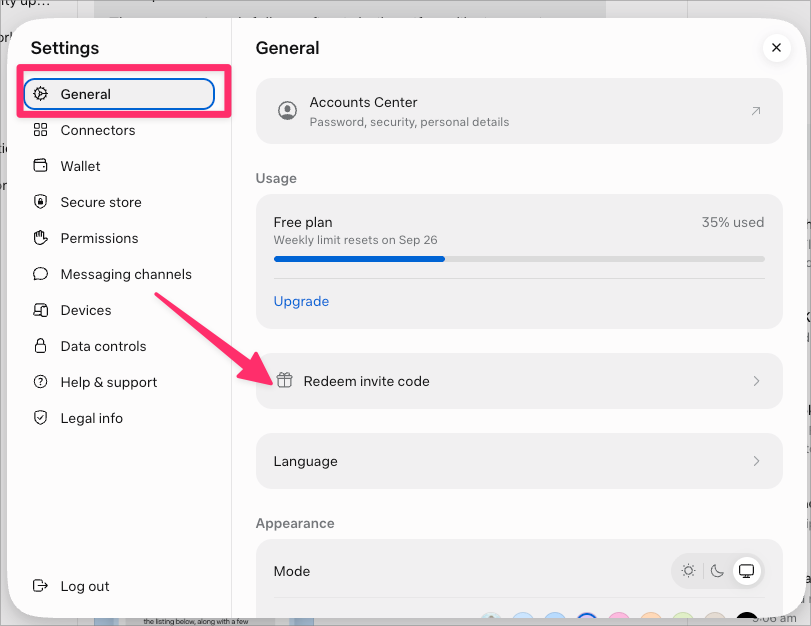
Open Settings → General → Redeem invite code. Meta has also called it Settings → Redeem Code. The community screenshot shows the General panel and the redemption option.
Remove accidental spaces and submit the code in Muse. Copying it on this website is only preparation; confirmation inside Muse is the redemption step.
Read the success message and check your account’s usage or reward information. If Muse shows an error, use the troubleshooting guide below. Do not assume the reward arrived just because the code was pasted.
Source: Meta’s web and app redemption instructions. Read 9 October 2026.
You use a Meta account to sign in to Muse. Meta’s getting-started guide describes creating an account through Facebook, Instagram, an email address or a phone number. Start from the official Muse entry point so your signup and code redemption happen in the right product.
Meta’s September 2026 small-business announcement identifies availability in the US and Canada. Its Help Center says Muse is not available everywhere and features can vary by area. This English guide serves readers worldwide, but an invite code cannot bypass a country or account restriction.
| Platform | What to know |
|---|---|
| Web | Use the official Muse website for account access, conversation and Settings. |
| iPhone and Android | The official join page provides mobile app entry points. Device permissions and available features can differ. |
| Mac | The desktop app can work with local files and selected apps after you grant macOS permissions. |
| Meta’s product page describes chatting with Muse through WhatsApp. Use Muse’s own setup flow for this connection. |
Before handing over your first task, set your preferred time zone and communication style, and decide which apps it needs. You can start with a research request that requires no private account connection, then connect additional services for tasks that need them.
Source: Meta’s September availability update. Read 9 October 2026.
Source: Official Muse product page. Read 9 October 2026.
These are real product images from Meta’s Muse design article. They show different parts of the experience rather than an invented dashboard. The pictured tasks and assistant named Veda are Meta’s examples, not results from this directory or a preview of your personal account.
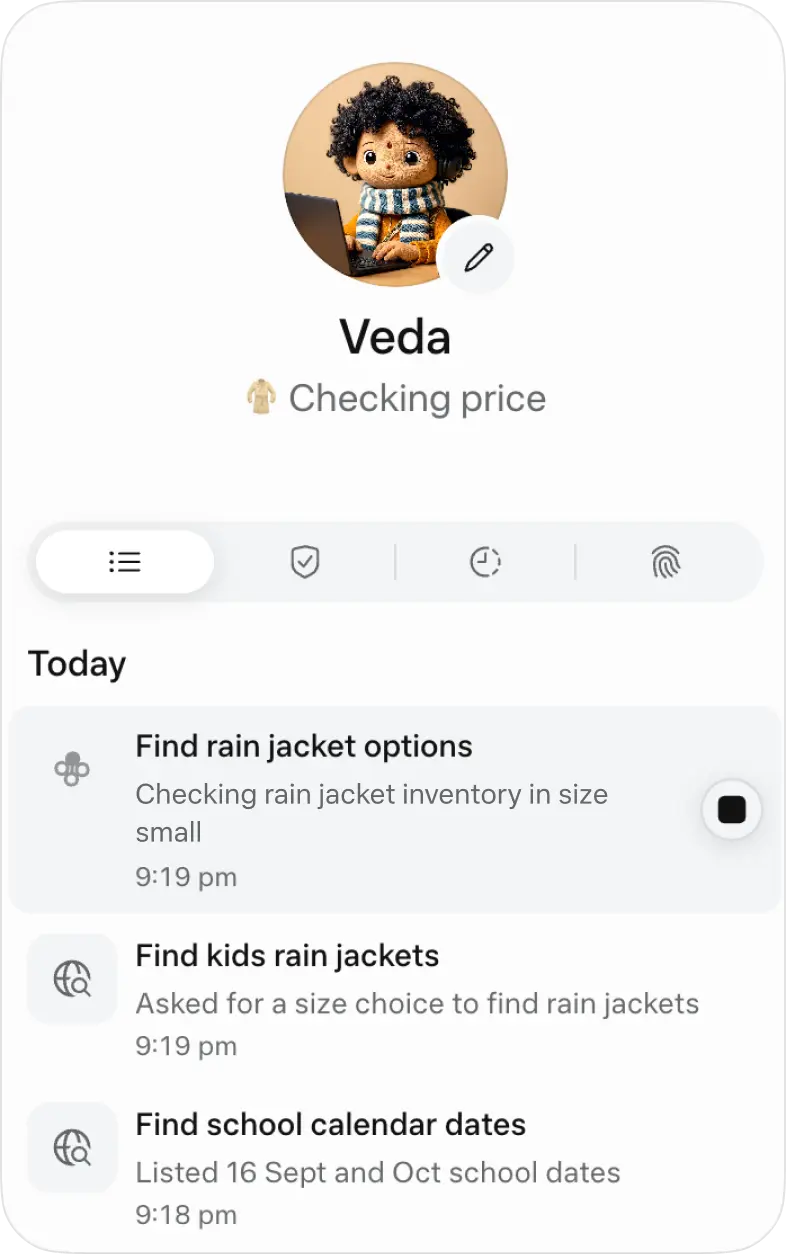
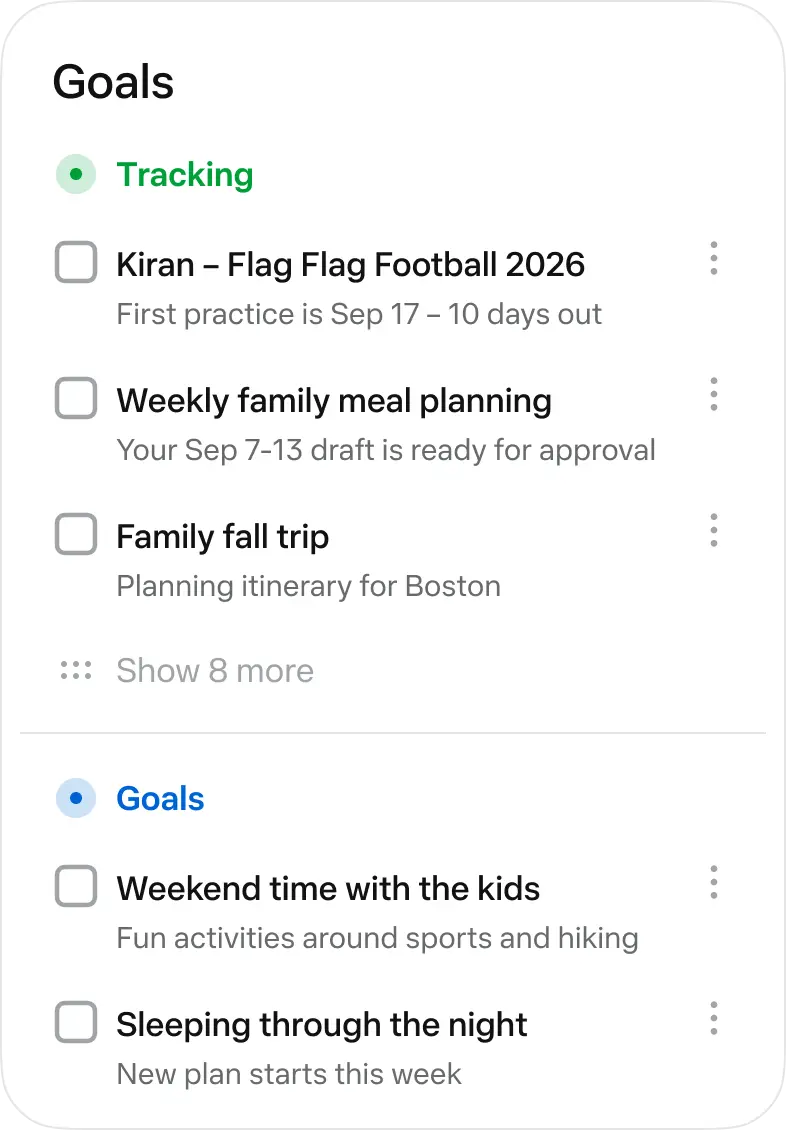
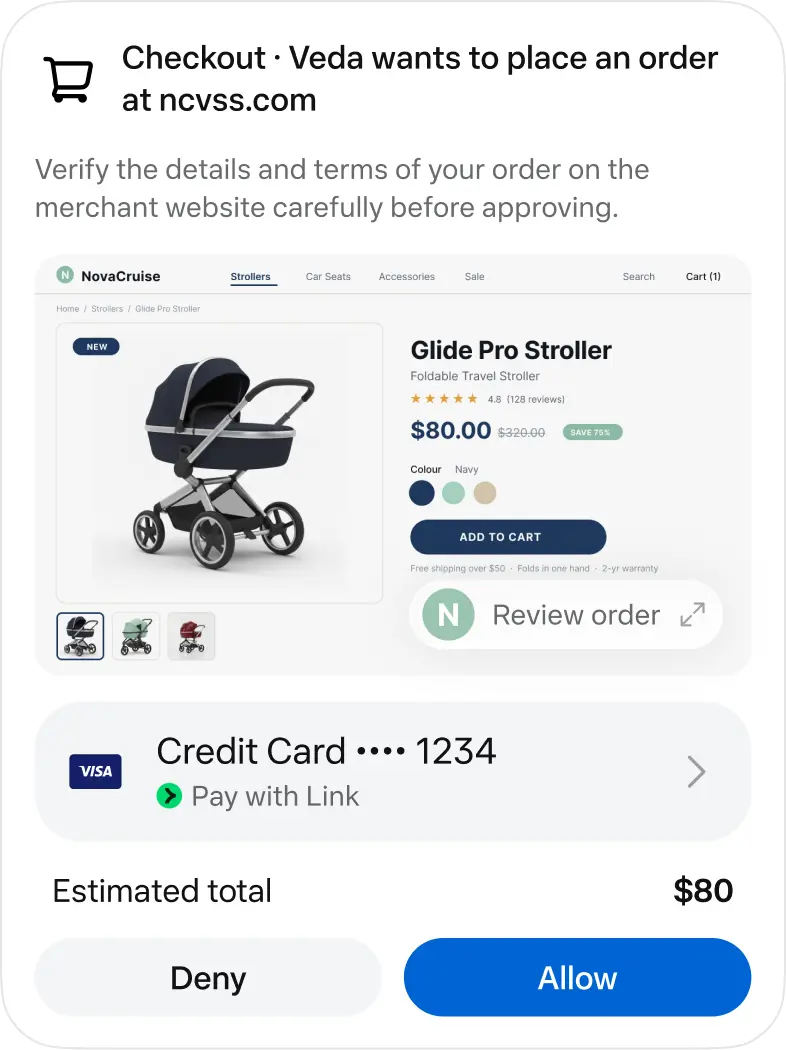

Source: Meta’s “How We Designed Muse” article; screenshots and official Muse logo. Read 9 October 2026.
Muse’s built-in skills cover research, documents, images, audio, dashboards and web browsing. It chooses relevant skills from your request, and you do not need to install those capabilities separately. Connected apps supply additional context or enable actions when a task needs them.
A good request describes the result, the inputs and the boundaries. The examples below are original starter prompts you can adapt; they are suggestions, not claims that we ran the tasks or measured their success.
Ask for options organized around your criteria, with sources and unresolved questions. Tell Muse whether you need a quick shortlist or a detailed comparison.
“Compare three weekend destinations reachable by train. Use a two-night budget of $300 and show the sources for fares.”
Turn uploaded material into a summary, draft or checklist. Specify the audience, format and items the document must preserve.
“Use my event notes to make a one-page volunteer briefing. Include arrival times, roles and a checklist of supplies.”
With suitable connectors, ask for a summary, draft or schedule proposal. Separate preparation from actions such as sending or changing an event.
“Summarize tomorrow’s meetings and draft the follow-up emails. Let me review the drafts before anything is sent.”
Use clear dates, budget, preferences and exclusions. A shortlist is easier to assess when each choice has a reason and a link to its source.
“Find a carry-on backpack under $100 with a laptop compartment. Compare sizes and shipping; prepare a shortlist for my review.”
Describe the intended output and how it will be used. For a visual or dashboard, provide the information that must appear and the format you need.
“Turn this CSV into an expense dashboard with monthly totals and category filters. Flag rows that need clarification.”
Combine approved business inputs into a useful working document. Ask for missing data to be identified instead of filled with invented details.
“Build a weekly operations brief from these notes. Separate completed work, open issues and decisions I need to make.”
Source: Meta’s guide to Muse skills. Read 9 October 2026.
A connector links Muse to a service you use. For example, calendar access supplies schedule information; an email connection can let it help with inbox tasks. You choose which connections to authorize and what actions to allow.
To add one, ask Muse to connect the service or open Settings → Connectors. Choose the connector, read the access information, continue and complete the service’s authorization steps. Where supported, read-only access is an option for tasks that only need information.
Meta’s small-business announcement names tools including Asana, Box, Canva, Dropbox, Figma, Granola, HighLevel, QuickBooks, Klaviyo, Lovable, Notion, Shopify, Slack, Stripe and Zoom, alongside Facebook and Instagram business capabilities. The connector list in your account determines which integrations you can actually set up.
Meta also describes custom connectors for services that are not in the built-in list. They can involve a service’s API information. A custom connector’s provider has its own terms and privacy practices, and Meta says it does not review custom connectors.
You can disconnect a service in Settings. This stops further data exchange through that connector; information already used in conversation or memory may remain. Treat connector access and stored history as separate controls.
Source: Meta’s connector setup and permissions guide. Read 9 October 2026.
Source: Muse for Small Business announcement. Read 9 October 2026.
An artifact is an output you can return to, such as a document, image or interactive tool. Muse can work with files you upload and create new ones from your instructions. Its Library provides access to generated files.
State the output format in your request. If you need a spreadsheet, describe the columns and calculations; for a document, describe the reader and required sections. When revising, name the existing file and the specific changes so the result is easy to review.
Meta says files are not shared externally unless you turn on sharing or approve a sharing request. Review a generated file’s content before distributing it, especially figures, names and quoted material.
Source: Meta’s artifact and supported-file guide. Read 9 October 2026.
Muse supports reminders at a set time, location-based reminders and repeating tasks. Include the date, time zone and repeat pattern. It can confirm the schedule, show active reminders and update or cancel them when you ask.
For instance, you could ask for a Wednesday evening planning reminder, then ask Muse to list the reminders it has scheduled. Meta’s guide points to the assistant icon’s Upcoming tab for scheduled work. Recurring tasks continue until cancelled, so remove schedules you no longer need.
Source: Meta’s reminders and scheduling guide. Read 9 October 2026.
Use a specific goal and a definition of done. A project such as “prepare a family trip” becomes clearer when you give dates, constraints and decisions that need your input. Review its progress and tell Muse when priorities change. Its Goals and activity views help you see ongoing work.
Source: Official Muse feature overview. Read 9 October 2026.
You can change Muse’s name, tone, response length and visual identity. Share preferences that help it respond usefully, such as your time zone or preferred level of detail. Customizations carry between conversations.
Meta also describes importing conversation history from another assistant through Settings → Data controls → Import memory, using an exported ZIP file. Review what you are importing before uploading it. You can ask Muse to update remembered information rather than leaving an incorrect preference in place.
Source: Meta’s personality and memory guide. Read 9 October 2026.
Muse is available for free with a usage limit. You can wait for that allowance to refresh when you reach the limit. Paid plans are optional; the referral promotion adds bonus usage and is separate from buying a subscription.
| Plan | Price | Usage |
|---|---|---|
| Free | $0 | Limited free allowance. The cited guide does not state a universal token amount. |
| Power | US$20 / month | 500 million Muse tokens per week. |
| Max | US$100 / month | 3 billion Muse tokens per week. |
These are the USD figures on Meta’s plan guide, not a worldwide price promise. Subscription availability and benefits can vary by account and region; the amount presented before purchase is the one to use. Meta says subscriptions renew monthly unless cancelled.
Compare three different numbers separately: the weekly plan allowance, the referral bonus pool and a code’s remaining redemptions. The “30 left” beside a code means reported invitation uses, not 30 tokens or 30 days of access.
There is no verified fixed conversion from tokens into completed tasks. A short request and a multi-step task can use different amounts. Start with a defined task, inspect the output and review the usage shown in your own account.
Source: Meta’s Muse subscription and pricing guide. Read 9 October 2026.
The Mac app can find and work with local files and read information from supported apps. This adds device access beyond Muse’s cloud workspace. Meta’s help page describes macOS permissions for Full Disk Access, Automation and Notifications.
Local app controls include Off, Read only, and Read and interact. Choose access that matches the task: reading information and sending a message require different levels of permission. You can turn off selected app access in Muse Settings and revoke device permissions in macOS Privacy & Security.
Give file tasks a clear location and output. For example, specify which folder to use, how to name the resulting files and whether you want a proposed organization plan first. Review changes while the agent works. Meta’s guidance notes that the agent may make mistakes or take unexpected actions.
Source: Meta’s Mac file and app access guide. Read 9 October 2026.
Meta describes an isolated cloud computer, a secure credential store and a separate permission system called Sentinel. It evaluates proposed actions and can ask for approval. Important actions such as purchases are presented for user review.
Security controls are not a guarantee of perfect results. Read the intended action, recipient, destination and relevant details before approving. If a task produces an unexpected result, pause to review what happened before authorizing another action.
Source: Meta’s explanation of Muse’s security architecture. Read 9 October 2026.
Meta’s data guide says the setting to help improve its AI models is on when you first use Muse. To turn it off, go to Settings → Data controls → Help improve our AI models, switch it off and confirm. The guide says the change also applies to previous interactions.
You can ask Muse what it has stored and use Data controls to download your Muse information. Deleting a conversation or disconnecting a service does not necessarily remove all information Muse has remembered from it; the guide separately describes asking it to forget a topic.
A full Muse reset removes chat history, files and active tasks and cannot be undone. Download information you need before considering a reset. Resetting is not a documented fix for a referral-code deadline.
Source: Meta’s guide to data controls, exports and reset. Read 9 October 2026.
Use the message shown inside Muse to decide what to do. The situations below are practical checks, not an official list of error messages or a claim that every failure has the same cause.
Copy it again from this directory, check for spaces and keep the six characters unchanged. In this list, 0KDJT6 starts with the number zero, NOFDDW contains the letter O, and W2II0Q contains two letter I characters followed by zero. The button preserves the exact code.
Choose another of the eight listed codes. Our counts are snapshots; a shared referral can be used elsewhere without this website seeing the redemption. Switching only helps with code availability, not an expired account window.
The official instructions specify redemption within 48 hours of joining. We have no verified extension method. Reinstallation, copying another code or resetting Muse is not a documented way to regain eligibility.
Start in Settings and look in General, as shown in the screenshot. Meta’s other reply uses the shorter label Redeem Code. Confirm that you are in Muse and signed into the intended account. If the option is absent, use Muse’s help and support controls rather than assuming a code can bypass the restriction.
Look for a redemption confirmation and inspect the usage or reward details in that same account. Save the message shown by Muse so support can understand the issue. This directory cannot add tokens or inspect a private Muse balance.
Your browser may restrict clipboard access. Select the code text and use your device’s Copy command, then paste into Muse. You do not need to sign up on this directory, and copying does not consume an invitation.
Source: Official Settings path and joining deadline. Read 9 October 2026.
Answers about referral codes, token rewards and the product you are joining.
Yes. All eight codes on this page are free to copy. Enter a code inside your Muse account; this directory does not ask for payment, your Meta password or a credit card. A paid Muse subscription is a separate product.
Yes. The invite promotion is running, as confirmed by this directory’s publisher on 9 October 2026. Eligible new users can redeem a shared code for the referral token reward. The 48-hour window and the code’s remaining uses still matter.
Meta’s official referral replies describe 1 billion Muse tokens for the new user and 1 billion for the inviter after an eligible redemption. This is a usage reward inside Muse; it is not cash or a paid subscription.
Open Muse, then Settings → General → Redeem invite code. Paste one of the eight codes and confirm. Meta has also used the shorter label Settings → Redeem Code; wording can differ between versions.
The official referral instructions specify redemption within 48 hours of joining Muse. We have no verified exception or reset method. Trying another code or reinstalling the app does not restart the joining deadline.
Meta’s official promotion reply says the referral bonus pool never expires. That is different from the 48-hour deadline to claim it. Weekly plan allowances follow their own reset schedule.
Muse has its own signup process. The referral code is entered in account Settings to claim the token reward; copying a code here does not create your account or redeem it automatically.
We have not verified any official rule allowing multiple referral rewards on one account. Use one eligible code and rely on Muse’s redemption result. This directory does not promise stacked rewards.
Meta described 20–30 uses depending on rollout. The numbers shown here are the publisher’s remaining counts for these particular codes on 9 October 2026, rather than a universal allowance.
Shared codes may be redeemed elsewhere after our count was recorded. A typing error, elapsed 48-hour window or an account restriction can also prevent redemption. The message shown by Muse identifies what to address.
No. The eight counts are a dated publisher report totalling 213 remaining invites. Copying a code does not reserve an invite or reduce the displayed number, and we have not retested the supplied codes.
No. The code is a referral reward, not a region-unlocking tool. Meta’s September announcement identifies the US and Canada, and its Help Center says availability and features vary by area.
Meta provides mobile apps, a web experience and a Mac app. Its product page also describes using Muse through WhatsApp. The Mac app has separate device permissions for working with local files and apps.
Yes. Meta provides free usage with a limit. When you reach it, you can wait for the allowance to refresh. Optional paid plans provide larger weekly allowances; the referral token reward is separate.
Meta says Muse can continue tasks in the background. You can return to its activity view to review progress and respond to pending approvals. Closing the app should not be treated as cancelling a task.
A skill is a capability Muse uses to perform work, such as research or creating a document. A connector links Muse with an app or service, such as your email or calendar. Skills are built in; connectors can require account authorization.
Yes. Meta’s help page describes Settings → Data controls → Help improve our AI models. Turn the setting off and confirm to opt out. The setting is on when you first use Muse, according to that guide.
It supports actions through its browser and connected services, with approval controls for important actions. Read the action details before approving, and manage permissions for the services you connect.
Look for the Invite control in your Muse account. We do not have a verified universal path for every app version. This website only publishes the eight publisher-supplied codes and does not accept additional community codes.
No. museinvitecode is an independent directory and guide. Meta operates Muse, its signup process and its referral rewards. Product screenshots are credited to their sources, and our own directory branding is separate.
The publisher supplied and checked these eight codes and the invite counts, and confirmed that the promotion is running. We have not retested the codes. Counts are reported as of 9 October 2026, and successful redemption is determined inside Muse.
This guide summarizes official Meta documentation and referral replies. Starter prompts are original suggestions; screenshots illustrate the product and are not our own account results. We do not claim measured task performance or universal availability.
Primary sources are linked beside the relevant sections. The redemption Settings image is credited to its community post; the logo and other product images come from Meta’s design article. Research date: 9 October 2026.
Referral disclosure: eligible redemption rewards both the new user and inviter with tokens. Signup, account access and rewards are handled by Muse. museinvitecode is independent and is not affiliated with or endorsed by Meta.